Settings Overview
The Settings hub is the control panel for your AccessPoint tenant. Everything that makes the app behave the way your office works — the roles people hold, the request types you accept, the letters and notices you send, the exemptions you cite, the calendars that drive due dates — is configured here. Almost nothing is hard-coded: AccessPoint follows a configuration-over-code approach, so an administrator can reshape the product without a developer or a redeployment.
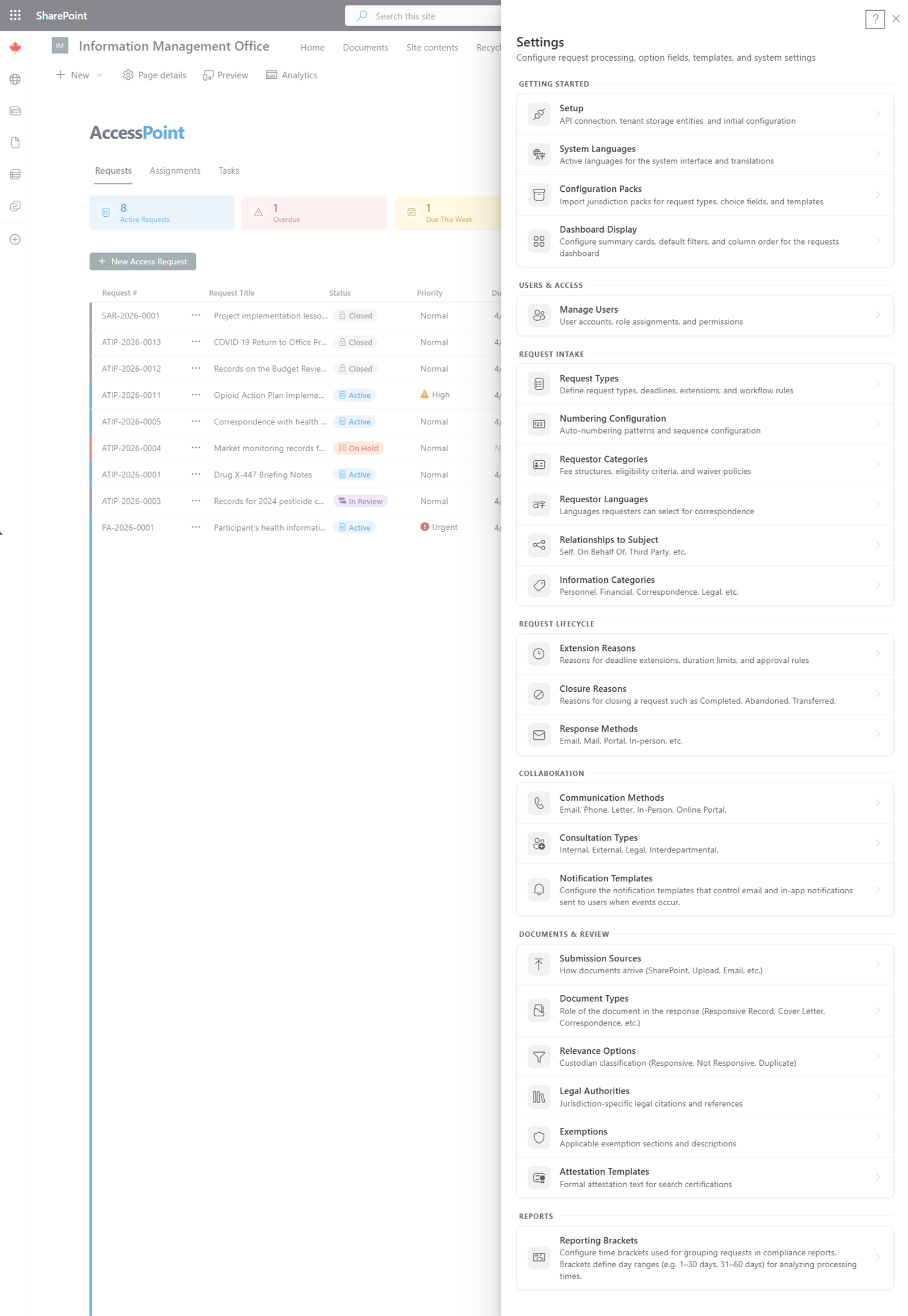
Open Settings from the app toolbar. The hub is a scrollable directory of every configuration area, organized into labelled groups. Each row shows an icon, the area name, and a one-line description; click a row to open its editor as a slide-in panel. Most editors present a list-plus-editor pattern with Add, an inline edit form, and a delete guard that blocks removing an item still in use. Where an item is user-facing, a translatable-field control lets you supply the text in each of your tenant's active languages.
Who uses it: Settings is an administrator area. Most write operations require the Administrator role, and some groups (review workflows, privacy configuration) appear only when you hold the matching *.configure permission.
Getting started
| Area |
Purpose |
| Setup |
First-run configuration: API base URL, Azure deploy/update, email + Teams notifications, the "Open in AccessPoint" app link, and the notification delivery health strip. |
| Jurisdiction packs |
Import a jurisdiction or universal pack to seed types, statuses, exemptions, templates, and calendars in one step. |
| Organization |
The institution display name merged into generated notices and letters, the intake mailboxes offered in New-from-email, and the reusable organization fact library. |
| Languages |
The tenant's active languages, default language, and display order — drives every translatable field. |
| Features |
Per-tenant, default-on opt-out toggles (task delegation, M365 capture, risk dashboard), plus the resource-gated document content search, OCR, and AI Assist toggles with the AI token-budget meter. |
| Data import & export |
Migrate historical caseloads from another system via a tenant-generated import template, and produce a business-readable Excel export of your requests, assessments, incidents, complaints, and registers. |
Users, roles & permissions
| Area |
Purpose |
| Manage users |
Assign or remove application roles per user, with a last-admin guard so you can't lock yourself out. |
| Roles & permissions |
Build tenant roles by granting individual permissions from a categorized catalog; each grant is global or scoped. |
Foundations
| Area |
Purpose |
| Calendars |
Business-day calendars: weekend days, jurisdiction, and statutory holidays that feed all due-date math. |
| Legal authorities |
The "which law" reference — type, jurisdiction, citation, and regulator — reused by exemptions and reporting. |
| Jurisdiction playbook |
Process guidance ("how do we handle X") the case assistant grounds on, scoped by legal authority. |
| AI suggestions |
The guidance-proposal inbox — accept, edit, or dismiss append-only refinements AI Assist drafts for playbook entries and catalog AI guidance — plus question mining, which clusters Ask AccessPoint questions into aggregate themes. |
| Hours tracking |
Enable self-entry of time and manage hours categories (fee-rate and scope). |
| Custom fields |
Tenant-defined fields added to entities for data the shipped fields don't cover. |
| Dashboard views |
Admin management of tenant-shared saved views across the entity dashboards. |
| Review types |
The kinds of review used by the review engine. |
| Review workflows |
Workflow templates — sequential or parallel stages, reviewers, gating, and reminders. |
| Required reviews |
The mapping that makes a review required at a stage of a request, assessment, incident, or complaint. |
Requests
| Area |
Purpose |
| Request types |
Categories with default durations, date conventions, expedited-processing rules, and the retention period (months) + start point that drive disposition. |
| Numbering |
The request-number pattern (prefix, separator, year, sequence) with a live preview. |
| Statuses |
Configurable status labels for the request lifecycle. |
| Extension reasons |
Reasons with suggested/min/max durations and the request types they apply to. |
| Response methods |
How responses are delivered to requestors. |
| Closure reasons |
The reasons a request can be closed (disclosed in full/part, refused, transferred, etc.). |
| Information categories |
Classifies the type of information being requested. |
Requestors
| Area |
Purpose |
| Requestor fee categories |
Media, public, business and similar categories used in volume reporting and fee logic. |
| Contact & institution taxonomies |
Translatable classification lists for requestor contacts and their organizations. |
| Requestor languages |
Preferred-language options offered on a requestor contact. |
| Relationships |
Requestor-to-subject relationship types (self, representative, third party). |
| Flow control |
Intake governance: active-request limit, hold reason, activation policy, and stale-hold days. |
Collaboration
Documents & review
| Area |
Purpose |
| Document workspace views |
Tenant-shared saved views pinned in the Documents workspace. |
| Document types |
Classify documents within a request. |
| Relevance options |
Mark document relevance during review. |
| Document tags |
The colour-coded tag taxonomy: categories, mutual exclusivity, and email-family cascade. |
| Exemptions |
The exemption/exclusion provisions cited when redacting; each links to a legal authority. |
| Redaction appearance |
Final redaction style, redline transparency, exemption overlay, approval-before-export, and whether unreviewed proposed redactions warn or block at response-package export. |
| Attestation templates |
The certification text a custodian signs when submitting. |
Privacy configuration
Visible only with the relevant configure permission.
| Area |
Purpose |
| Assessment types |
PIA/AIA/Security types, scoring, tiering, and summary templates. |
| Assessment templates |
The questionnaire builder — sections, questions, versioning, and screeners. |
| Controls library |
The shared control catalogue — privacy, security, and organizational measures (ControlKind + reference-framework citation) — that Security (SA&A) assessments build their SSP from and privacy subjects link for their statement of applicability; pack-seeded and tenant-extensible. |
| Control option lists |
The Controls-library lookups: control families, control kinds, and baseline profiles. |
| Assessment statuses |
Configurable status labels for the assessment lifecycle. |
| Privacy subject choice fields |
Subject types (with the AI/ADM system flag), categories of personal data (shared with incident reporting), categories of data subjects, and categories of recipients. |
| Incident types |
Categories for privacy incidents and breaches. |
| Incident statuses |
Configurable status labels for the incident lifecycle. |
| Incident choice fields |
Cause, PI-category, harm, containment, remediation, and notification taxonomies. |
| Complaint types |
Categories for complaints and appeals, each carrying its grounds, disposition and allegation-finding vocabularies, and the direct-complaint clock policy. |
| Complaint statuses |
Configurable status labels for the complaint lifecycle. |
| Risk categories |
Shared risk-register categories and appetite settings; also the retention period for standalone risks. |
Each of these case types (assessment, incident, and complaint types, plus request types above and risk categories for standalone risks) also carries a retention period — how long a closed case is kept before it becomes eligible for disposition. Blank means keep indefinitely. See Retention Review for how the periods are applied across all five registers.
Reporting configuration
System & compliance
| Area |
Purpose |
| Audit ledger |
The append-only, hash-chained record of significant actions, with server-side integrity verification. |
Navigating Settings
To open the Settings hub, click the Settings icon in the app toolbar. You must have the Administrator role (and, for privacy groups, the matching configure permission) to view and modify settings. Each editor follows a consistent list-plus-editor pattern, and changes take effect immediately after saving.