
Complaint types — complaint vs appeal kinds, governing authority, filing window, grounds, dispositions, allegation findings, and the direct-complaint policy
Last updated: July 29, 2026 by Steve
Complaint Types
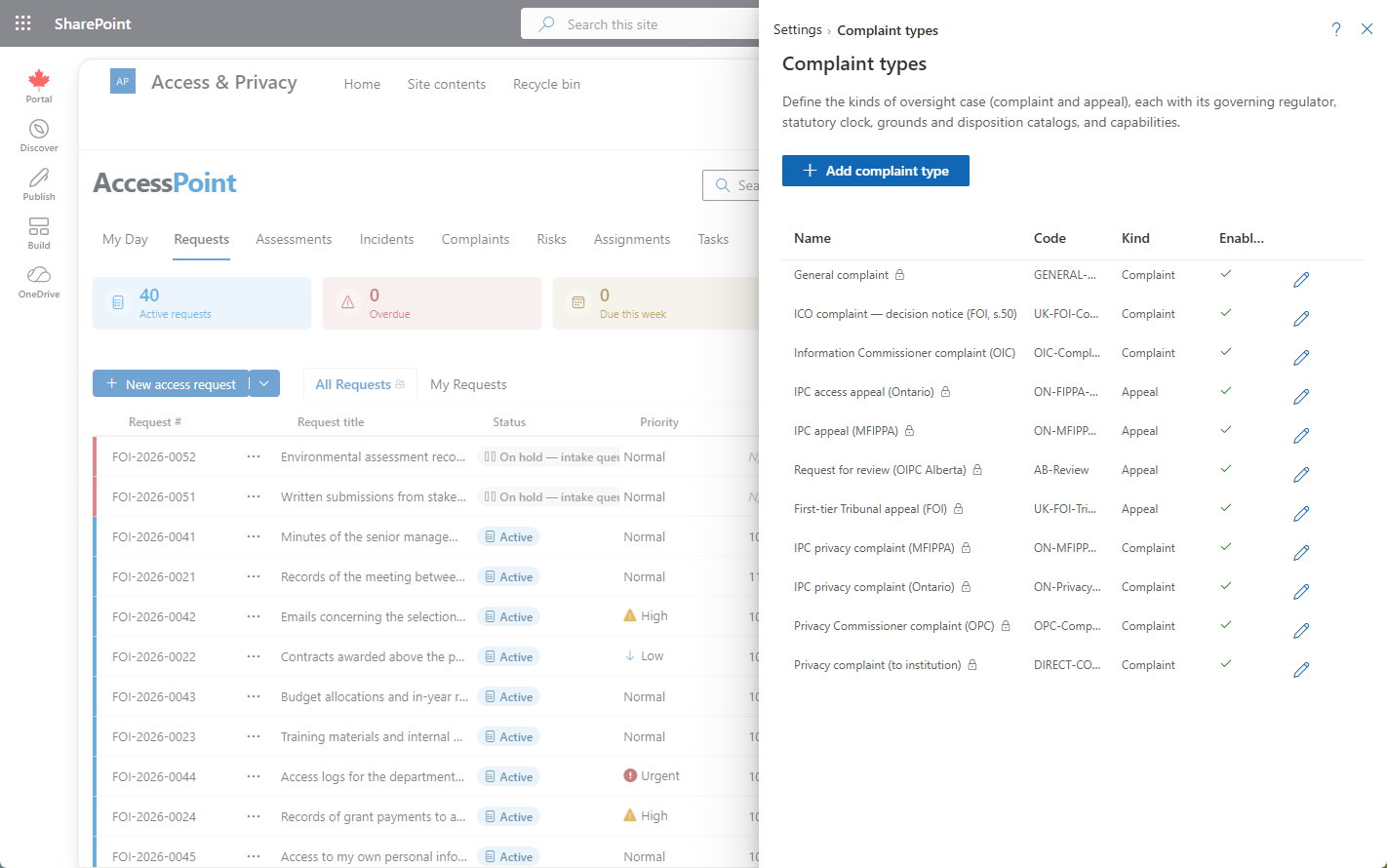
Complaint types are the categories a complaint or appeal is registered under, and each one carries the rules that shape the whole record. A type sets the kind (complaint or appeal), the governing authority (the regulator office), the filing-window rule used for the admissibility check, the grounds catalogue offered at intake, and the disposition vocabulary offered at closure.
Where to Find It
Open Settings from the app toolbar and choose Complaint types in the Privacy configuration group. This group is visible only to users who hold the relevant privacy configure permission.
Options and Fields
| Field | What it controls |
|---|---|
| Name | The type's label, translatable across your active languages. |
| Kind | Complaint or Appeal. Each option is tagged accordingly at intake, and an appeal-kind type flips the panel wording (for example the title and received-date labels). |
| Governing authority / regulator | The oversight body the matter sits with. Shown read-only beneath the type at intake. |
| Default intake origin | The suggested origin — Regulator investigation or Direct to institution. Staff can override it; the origin decides whether the record later passes through a Submitted stage. |
| Filing-window rule | The window used to compute the admissibility deadline and the advisory "in time" hint. |
| Grounds catalogue | The list of subject-matter grounds a registrant can pick from. |
| Disposition vocabulary | The set of outcomes available at closure (for example well-founded, not well-founded, resolved). |
| Allegation finding vocabulary | The findings available when recording per-allegation determinations on the Outcome tab (for example well-founded / not well-founded). |
| Direct-complaint policy | For the direct-to-institution lane: the acknowledgement deadline, the response target, the recommendation-response window, and whether those clocks count business or calendar days. These drive the direct-lane key dates, the "Action due (direct)" dashboard flags, and the My Day nudges. |
How It Affects Complaints
- The type is the first, required choice at intake and drives everything below it, including the read-only regulator / governing authority.
- Choosing an appeal-kind type flips the wording throughout the panel; the workflow itself is identical.
- If the type defines a filing window, an admissibility hint banner tells the registrant whether the matter is in time against the computed deadline. It is advisory and never blocks registration.
- If the type has a grounds catalogue, the registrant selects a ground at intake.
- At closure, the Close dialog offers the disposition from the type's disposition vocabulary.
Best Practice
Define separate types for each regulator and for the complaint-versus-appeal distinction, so the correct governing authority, filing window, grounds, and dispositions all attach automatically the moment staff pick the type at intake.
Retention
Each complaint type carries a retention period (months) that governs when its closed complaints become eligible for disposition, measured from the closed date or, optionally, the date the response was sent. Blank means keep indefinitely (the default). See Retention Review.