
Localization & formats — the tenant default currency, the house date-format override, and the fiscal-year start month
Last updated: August 09, 2026 by Steve
Localization & Formats
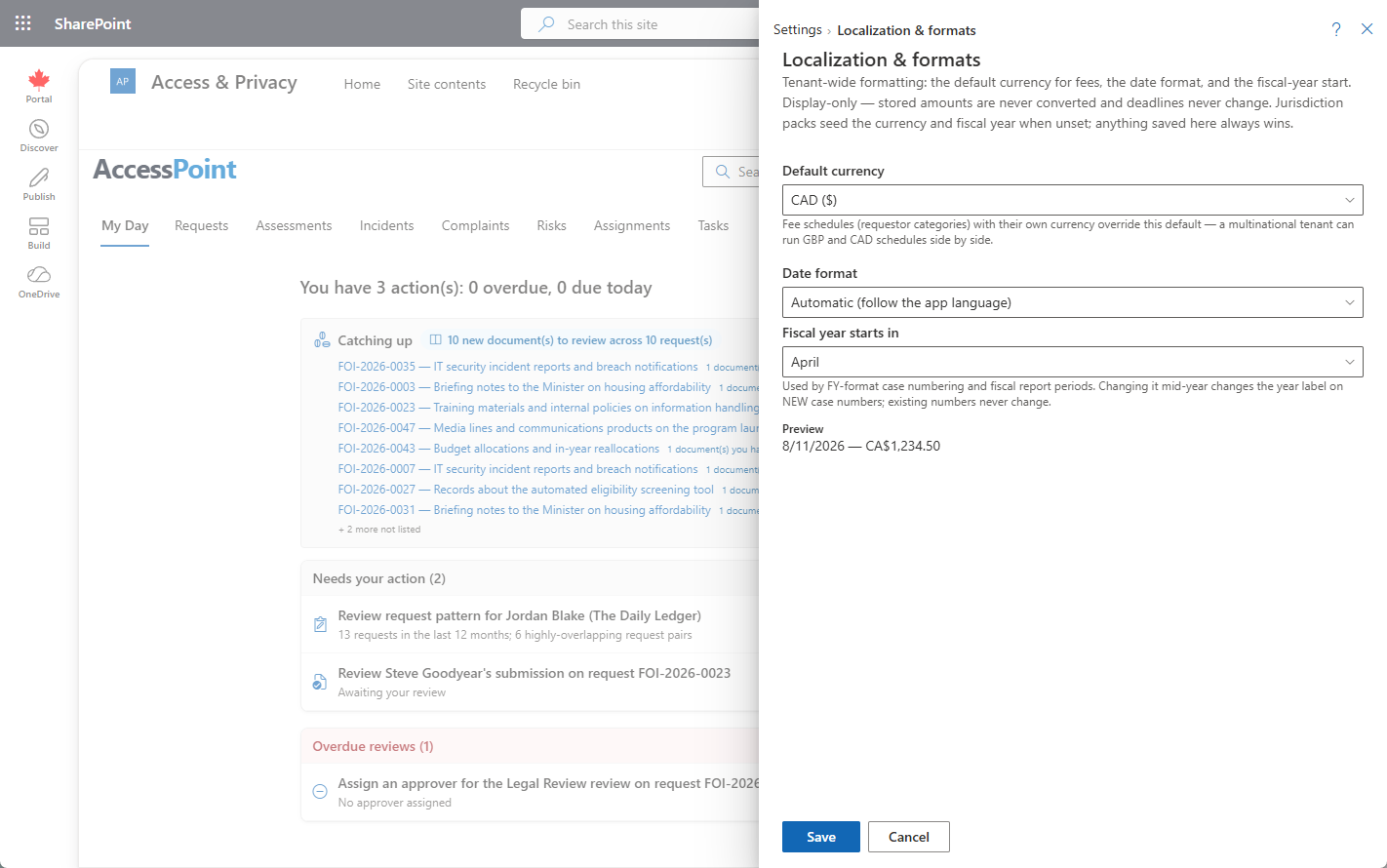
Money and dates in AccessPoint follow your jurisdiction, not a hardcoded convention. This panel holds the three tenant-wide settings that decide how they are presented: the default currency, an optional date-format override, and the fiscal-year start month.
Where to Find It
Open Settings from the app toolbar and choose Localization & formats.
Settings Reference
| Setting | What it does |
|---|---|
| Tenant default currency | The ISO currency used everywhere a fee schedule doesn't state its own. Seeded automatically from your first jurisdiction pack. |
| Date format | An optional house format pinned across the interface — ISO, day/month/year, month/day/year, or long form. Left unset, dates follow the selected interface language. |
| Fiscal-year start month | The month your fiscal year begins (April, July, October…). Drives FY-style case numbering and fiscal report periods. Jurisdiction packs seed it too. |
Currency
Each fee schedule — that is, each requestor category — states the ISO currency its rates are in. Jurisdiction packs ship this, so importing the UK pack gives you £ fee schedules and the Canadian pack gives CA$ ones, side by side in the same tenant. The tenant default set here covers everything else, and it is seeded automatically from your first jurisdiction pack.
Amounts are never converted between currencies. The code only controls display: a rate recorded as 25 in a £ schedule is £25, and nothing in AccessPoint restates it as anything else. If your office genuinely charges in two currencies, that is a matter of two fee schedules, not an exchange rate.
Dates
By default, dates follow the selected interface language, so each user reads them in the convention their language expects. An administrator can override that by pinning a house format here — ISO, day/month/year, month/day/year, or long form — when the office wants one convention everywhere regardless of who is looking.
Two things behave deliberately differently:
- Generated letters render dates long-form in the letter's own language ("7 August 2026" / "7 août 2026") unless a format is pinned. A letter is a document a person reads, so it reads naturally in their language.
- Evidence packages and audit exports always use ISO dates, whatever is set here. They are verification artifacts, and an unambiguous date is part of what makes them verifiable.
Fiscal Year
The fiscal-year start month drives two things: FY-style case numbering and the periods used by fiscal reports. Jurisdiction packs seed it, so an imported pack usually gets it right for your jurisdiction without intervention.
Changing it mid-year only affects the year label on new case numbers. Numbers already issued are untouched — a case number is an identifier that has already been quoted in correspondence, so AccessPoint will not retroactively relabel it.
Tips
- Import a jurisdiction pack first: it seeds the default currency, the fee-schedule currencies, and the fiscal-year start month for you, and you adjust from there.
- Leave the date format unset unless you have a reason to pin one — following the interface language is usually what multilingual offices want.
- Set the fiscal-year start month before you begin issuing FY-style case numbers, so a single fiscal year's numbering stays internally consistent.
Related Pages
- Jurisdiction Packs — what seeds the default currency, the per-schedule currencies, and the fiscal-year start month.
- System Languages — the active languages that dates follow when no house format is pinned.
- Calendars — the other half of date handling: which days count as business days for due-date math.
- Numbering Configuration — the case-number pattern the fiscal-year start month supplies the year label to.
- Requestor Categories — the fee schedules that each state their own ISO currency.