
Privacy subject choice fields — subject types (with the AI/ADM flag), categories of personal data, categories of data subjects, and GDPR Art.30 recipient category taxonomies
Last updated: August 06, 2026 by Steve
Privacy Subject Choice Fields
Privacy subject choice fields is the grouped settings panel for every configurable taxonomy a privacy subject draws on — its type, and the option lists behind its GDPR Article 30 Record of Processing Activities (ROPA). It replaced the older, narrower "ROPA option lists" panel: subject types now live here too, alongside categories of personal data, categories of data subjects, and recipient categories, so every list a subject's Details tab offers is configured in one place.
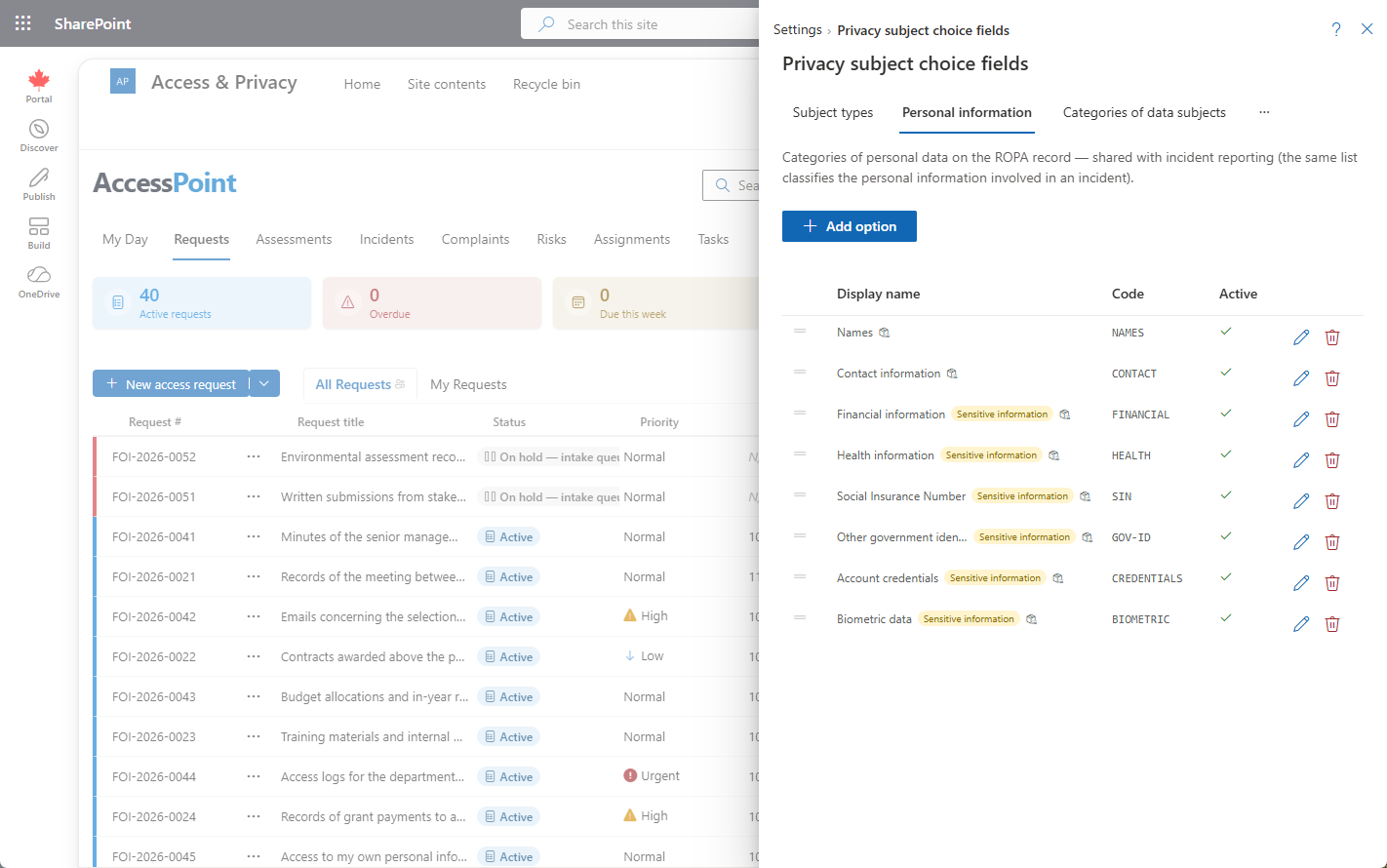
Subject types used to have their own settings page. They now live in this grouped panel alongside the other subject taxonomies, so administrators configure a subject's type and its ROPA option lists in one place rather than two.
Where to Find It
Open Settings from the app toolbar and choose Privacy subject choice fields in the Privacy configuration group. This group is visible only to users who hold the relevant privacy configure permission.
The Lists
| List | Where it appears |
|---|---|
| Subject types | The Type field on a privacy subject, and the type filter on the Subjects directory. |
| Categories of personal data | The categories of personal data field on a subject's Records of processing (ROPA) block — and the same list is offered when reporting an incident's affected personal-information categories, so the two stay in sync. |
| Categories of data subjects | The categories of data subjects field on the same ROPA block. |
| Recipient categories | The recipient categories field on the same ROPA block. |
Every list here is drag-and-drop reorderable, and every entry supports per-language names across your tenant's active languages, so administrators arrange each list to match how their office actually talks about its programs and set the display order users see in the picker.
Subject Types
Subject types are a configurable taxonomy — not a fixed enum — seeded by the Universal Baseline pack with a starting set (Program, Business process, IT system, AI system, and more) that you can rename, reorder, or extend. Each type carries:
- Name, translatable across your active languages.
- AI/ADM system flag — mark a type as an automated decision-making (ADM) system and every subject created with that type unlocks the AI/ADM system register section on its detail panel (technical and privacy owners, model/service, deployment status, risk classification, and a data-source inventory — see Privacy Subject Details). Types that aren't AI/ADM systems never show that section, so ordinary programs and systems stay uncluttered.
Because the flag lives on the type, tagging one type as an ADM system applies the register to every subject of that type going forward — you don't set it subject by subject.
Categories of Personal Data, Data Subjects, and Recipients
These three lists are the GDPR Article 30 taxonomies behind a subject's ROPA record:
- Categories of personal data describes what personal information a processing activity involves. It is shared: the same list populates the categories-of-personal-information selector when reporting an incident, so an incident and the subjects it touches speak the same vocabulary.
- Categories of data subjects describes whose personal information is involved (employees, clients, minors, and so on).
- Recipient categories describes who the personal information is disclosed to.
The ROPA block these lists feed sits alongside a subject's other Article 30 details — processing purpose, lawful basis, retention period, security measures (including linked controls), hosting location, and the international-transfer flag — and the vocabulary you set here flows into the Export ROPA register produced across all subjects.
Best Practice
Model the categories-of-personal-data, data-subject, and recipient lists on the GDPR Article 30 language your regulator expects, and keep them stable — subjects are durable records reused across assessments and incidents, so a consistent taxonomy makes your exported Record of Processing register far easier to defend. For subject types, keep the AI/ADM flag accurate: it is what turns on AI-governance reporting (the register and the AI systems report) for every subject of that type.