
Correspondence sign-off — the correspondence purposes a case's senior official must approve before the letter can be sent
Last updated: August 09, 2026 by Steve
Correspondence Sign-Off
Some letters are decisions, not messages. A response letter states what is disclosed and what is withheld, and it starts the requestor's appeal rights. Correspondence sign-off lets you require the case's senior official to approve those letters before they can be sent: you tick the correspondence purposes that need approval, and a letter sent for one of those purposes is held for the accountable official instead of going out on the drafter's say-so.
Where to Find It
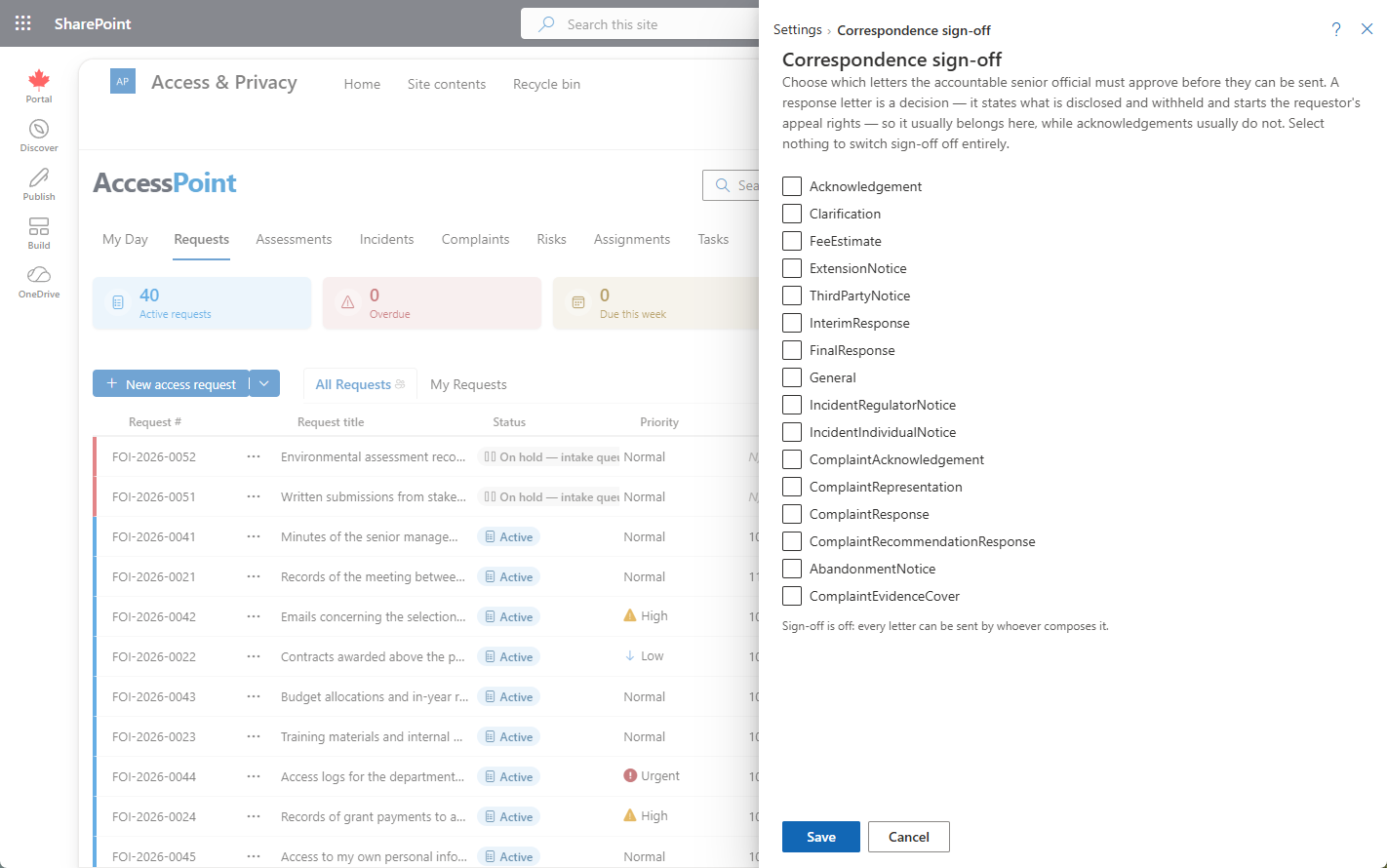
Open Settings from the app toolbar and choose Correspondence sign-off.
What You Configure
The panel is a single list of correspondence purposes. Tick the ones that need approval — typically the response letter and third-party notices, rarely acknowledgements.
| Selection | Effect |
|---|---|
| Nothing ticked | Sign-off is off entirely. Every letter sends as normal. |
| One or more purposes ticked | A letter sent for a ticked purpose is held for the case's senior official to approve before it can be sent. |
There is no separate on/off switch. Ticking nothing is how you turn sign-off off, which means a toggle and a list can never drift out of step with one another — the list is the whole control.
Keyed on Purpose, Not on Template
The rule attaches to the letter's purpose, not to a particular correspondence template. Two things follow from that:
- A template added next year inherits the rule. A per-template flag fails open: someone creates a new response-letter template, nobody remembers to tick its approval box, and the control quietly stops applying to the letters it was written for.
- Free-form correspondence is covered. A letter composed from scratch, with no template behind it, still has a purpose — so it is still caught.
Who Signs Off
Each case can name a senior official: the person accountable for the decisions on it, as distinct from the coordinator who does the work. Naming someone gives them access to that case only — enough to read it, see the requestor, open documents, and act on reviews. That is what makes it usable for a single case, including for an external adviser who is a guest in your tenant, without granting a role that would show them everything.
Who can be named at all is controlled by the Act as senior official permission, granted through roles and permissions. The permission by itself grants access to nothing.
Drafting
For a purpose that needs sign-off, the composer's Send button becomes Submit for approval.
The composer names who will approve the letter, and it warns before you draft anything if the case has no senior official assigned. On a statutory clock, discovering that after the letter is written costs days you cannot get back.
Approving
Held letters appear in two places: a Letters awaiting sign-off panel on the case, above the correspondence log, and on the official's My Day.
The approver sees the letter body and how many documents are attached — approving a response without reading what is being released is not a control. From there they can:
- Approve — the letter is cleared.
- Request changes — with a note, which returns the letter to the drafter.
Sending
Approving does not send. The approved letter goes out as a separate, deliberate step — exactly as it was approved, and only once.
Who Sends Without the Round Trip
Anyone holding Act as senior official (case.approve) sends these letters directly, with no submit-and-wait step, because they already hold the authority the sign-off exists to obtain.
That is also the lever if you want two different people on every letter: grant the permission only to your senior officials. Give it broadly and you have configured a control that most of your staff can satisfy on their own.
Best Practice
- Tick the purposes where the letter is a decision — the response letter, third-party notices — and leave routine acknowledgements out, so approval does not become a rubber stamp nobody reads.
- Name the senior official when the case is opened, not when the response letter is due. The composer's warning is a safety net, not a plan.
- Review who holds Act as senior official before you rely on sign-off as a two-person control.
Related Pages
- Correspondence Templates — the letters themselves; sign-off is keyed on their purpose rather than on the individual template.
- Roles and Permissions — where Act as senior official is granted, and therefore who can be named and who sends directly.
- Sending Correspondence — the composer, where Send becomes Submit for approval.
- Correspondence — the record of a single letter, email, or call, with its attachments and notes thread.
- Review Types — the other second-pair-of-eyes mechanism: named review steps routed by the review engine.