
Case hygiene — open QA findings across every open case, from the same deterministic rules as the per-case Case check card.
Last updated: August 06, 2026 by Steve
Case Hygiene Report
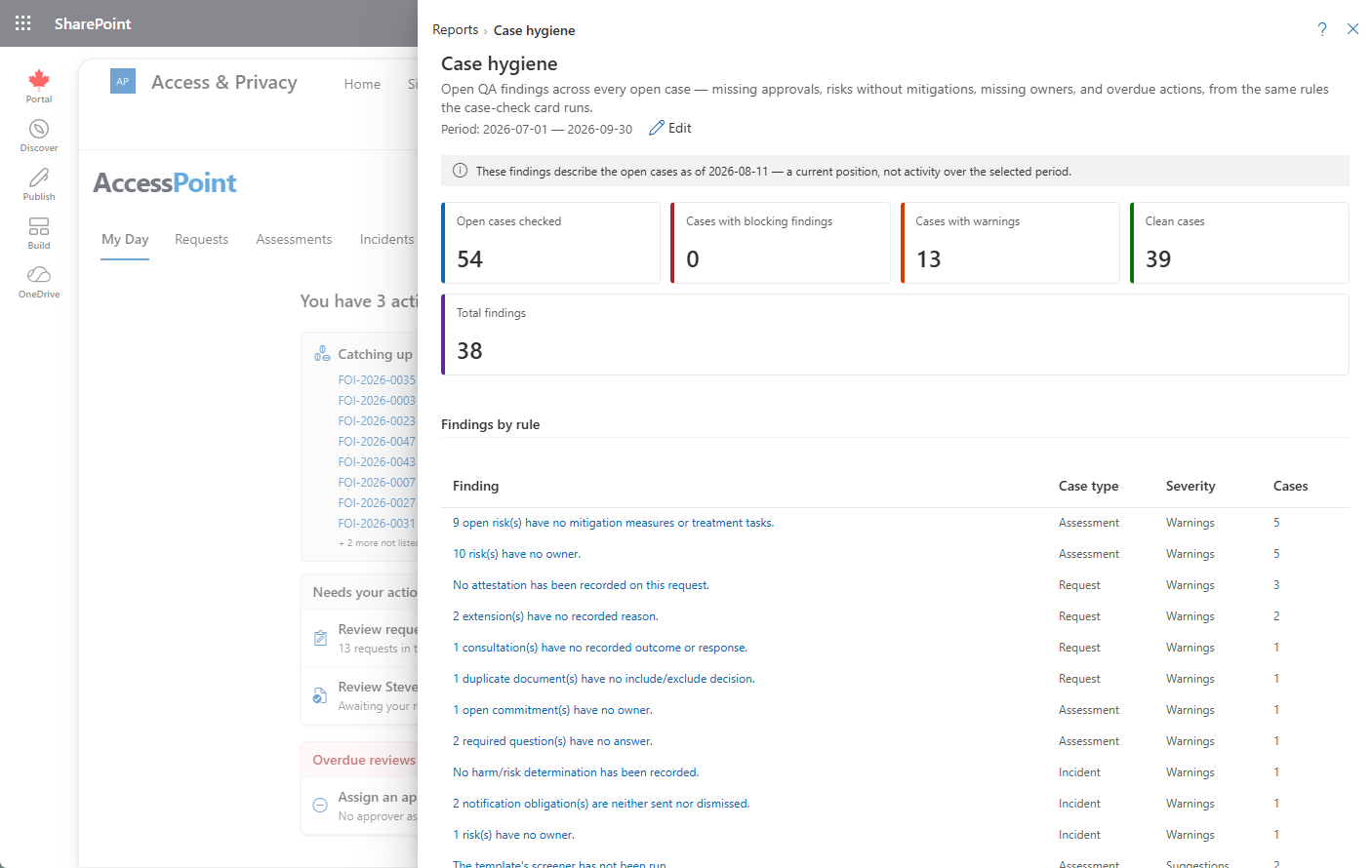
The Case Hygiene report is the tenant-wide quality check: every open QA finding across every open case, surfaced in one place instead of hunting case by case. It runs the same deterministic rules that drive the Case check card in each case's own AI Assist sidebar — so what you see here is exactly what a careful reviewer would flag, not a machine's opinion of one.
What This Report Shows
- Overdue cases and overdue actions — open work that has passed its due date.
- Missing approvals and attestations — steps that should carry a sign-off but don't yet have one.
- Redactions citing no exemption — marks applied without the citation a defensible disclosure needs.
- Risks without mitigations or owners — register entries with no treatment plan, or no one accountable for one.
- Commitments without owners — tracked promises nobody is named against.
- Unanswered required questions — mandatory questionnaire fields still blank.
- Stale evidence sets — search/collection evidence that hasn't been touched in a defined window.
Each finding links back to the case it belongs to, so the report is a worklist, not just a scoreboard.
Same Rules as the Case Check Card
These are deterministic rules that run on every tenant, whether or not AI Assist is deployed — no AI is required to produce this report. The identical rule set also drives the Case check card in each case's own AI Assist sidebar, so a coordinator working one case and a manager scanning the whole caseload are always looking at the same definition of "clean." When AI Assist is deployed, the per-case card can add optional AI consistency observations of its own — advisory notes on that one case only, never a factor in this tenant-wide report.
Reading the As-Of Banner
Case Hygiene describes a current position, not activity inside the period you've selected. The panel carries an as-of banner instead of narrowing its findings to a date range — a redaction that's been missing its exemption citation since last month is still a gap today, and filtering it out by date would defeat the point of a hygiene check.
Using This Report
Work it the way a QA pass works any worklist: pick a finding category, open each flagged case from the link, and fix or dismiss what you find. Because the same rules also run inside each case's own Case check card, resolving a finding there clears it from this report the next time it's viewed — there's nothing separate to reconcile.
Related Pages
- Reports — the reports menu this report opens from.
- Ask AccessPoint (Case Assistant) — the case's AI Assist panel, home to the Case check card these rules also drive.
- Risk Details — where a flagged risk's owner and mitigation are set.
- Commitments Report — the companion view of whether tracked promises are being kept.